

kcenter#
- Keypoints.kcenter(type_='', val1='', val2='', val3='', val4='', kpnew='', **kwargs)#
Creates a keypoint at the center of a circular arc defined by three locations.
Mechanical APDL Command: KCENTER
- Parameters:
- type_
str Type of entity used to define the circular arc. The meaning of
VAL1throughVAL4will vary depending onType. IfType= P, graphical picking is enabled and all remaining command fields are ignored (valid only in the GUI).KP- Arc is defined by keypoints.LINE- Arc is defined by locations on a line.
- val1
str Values used to specify three locations on the arc (see table below).
- val2
str Values used to specify three locations on the arc (see table below).
- val3
str Values used to specify three locations on the arc (see table below).
- val4
str Values used to specify three locations on the arc (see table below).
- kpnew
str Number assigned to new keypoint. Defaults to the lowest available keypoint number.
- type_
- Returns:
intKeypoint number of the generated keypoint.
Notes
Warning
This function contains specificities regarding the argument definitions. Please refer to the command documentation for further explanations.
kcenter should be used in the Cartesian coordinate system ( csys,0) only. This command provides three methods to define a keypoint at the center of three locations. As shown below, the center point can be calculated based on a) three keypoints, b) three keypoints and a radius, or c) three locations on a line. Note that for method c, if a circular line is specified by
VAL1,VAL2throughVAL4are not needed.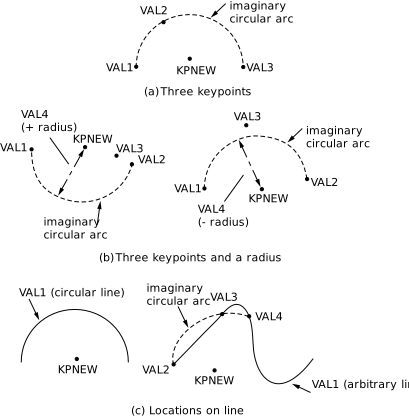
Examples
Create a keypoint at the center of a circle centered at (0, 0, 0)
>>> k0 = mapdl.k("", 0, 1, 0)
>>> k1 = mapdl.k("", 1, 0, 0)
>>> k2 = mapdl.k("", 0, -1, 0)
>>> k3 = mapdl.kcenter('KP', k0, k1, k2)
>>> k3
4